Skip to content

Chrome extension · Available on the Chrome Web Store

Turn your documents into filled online forms.

FormBlessed finds relevant information in supported documents, spreadsheets and images, then matches it to the form you connect—without manual field mapping or fixed source templates. Optional Google Drive imports depend on connection access.

Approve the destination and start processing; FormBlessed fills supported fields for you to review and correct before you choose Save.

See FormBlessed at work

Documents in. Reviewed fields out.

Forms first, source review alongside them, and supported Olivia chats as another example.

Watch on YouTube · 55 seconds

This YouTube player uses privacy-enhanced mode. Loading or using it can send technical information to Google. Privacy

Documents to reviewed online forms

Made for the forms you work with.

Use the files you have

Import PDF, DOCX, XLSX, PPTX, CSV, PNG, JPG/JPEG or WebP files, up to 16 MB (16,000,000 bytes) per file. You can also paste copied spreadsheet cells.

Choose the files and worksheets to include. Information can be spread across rows, cells, sheets or documents; you do not need to set up a column-to-field map.

Match, fill and review

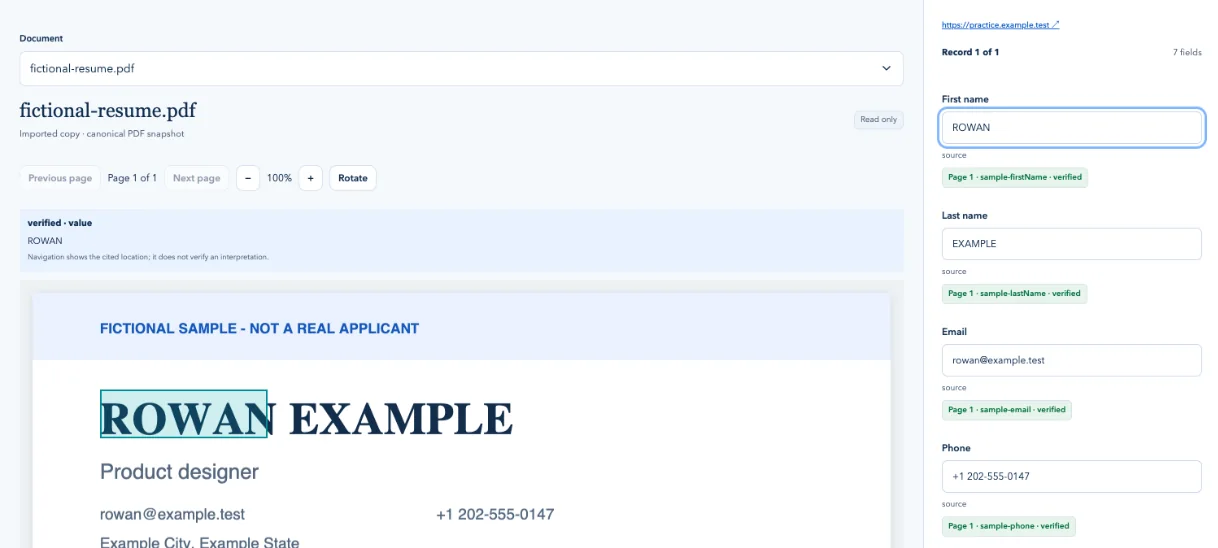
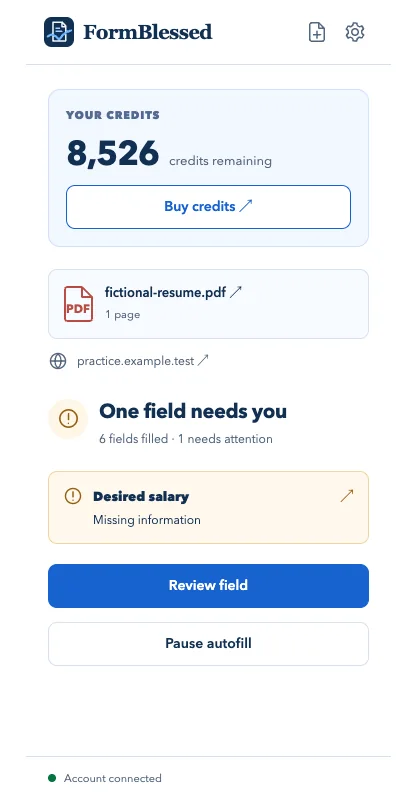
After you approve Start, available suggestions can fill supported controls immediately. Check the filled page, correct values and inspect source evidence before saving.

Missing or conflicting information, unreadable content and unsupported website controls can need manual handling. A citation helps you inspect an answer; it does not guarantee accuracy.

Import from Google Drive

When Google Drive connection access is available, FormBlessed supports selecting individual files with Google Picker. Google Docs and Slides become PDF snapshots; Google Sheets become XLSX. Imports do not edit the original file or synchronize later changes.

Answer supported Olivia chats

For supported English Olivia recruiting chats, FormBlessed can answer factual questions from your selected applicant documents and retain the chosen applicant and job context across supported form and chat steps.

Consent, interview choices, missing or uncertain information and final submission keep their review steps. Website and widget compatibility vary.

One Lavenberry account

Your account, budget and decisions.

A connected account and processing credits are required for extraction and AI matching. FormBlessed uses the credits in your Lavenberry account. Eligible trial access shares the same balance and expiration; no separate FormBlessed trial grant is promised. Check your account balance and processing budget before starting.

Selected source content, your instructions and relevant connected-form or chat context are sent to the hosted service and its document/AI processors. Filled values are visible to the destination website before final Save.

You stay in control

You choose when to save.

You control page transitions and final submission. Save through the website or explicitly choose Save in FormBlessed. FormBlessed checks the observed save outcome before advancing; uncertain outcomes need review.

Questions about using your documents

Can I use FormBlessed for forms beyond job applications?

Yes. You can use it across supported contact, registration, business and application forms. Job applications are one example. Some website controls, missing information and protected steps still need manual input.

Do I need to format documents or map columns first?

No predefined source layout or manual field mapping is required. Select supported files and worksheets, approve the destination and processing, then review the results. Relevant facts must be present and readable in your sources.

Does Google Drive import keep files synchronized?

No. You choose individual files and import snapshots. FormBlessed does not edit the originals or continuously sync changes. Access depends on the Google app’s connection settings; general public Google Drive availability has not been verified.

Does FormBlessed submit an application automatically?

No. Filling can happen after you approve Start, before a separate review confirmation. You decide when to save or submit. Consent and other protected choices retain their review steps.

Available for Chrome

Get FormBlessed for your next form.

Install FormBlessed from the Chrome Web Store. Connect your Lavenberry account and check your processing credits before starting. Google Drive imports depend on connection access. This page accepts no files and starts no paid processing.

Add to Chrome