CopyCat guide
Claude Code skill examples you can build from a recorded workflow
A recorded routine can become a Claude Code skill when it repeats, has clear inputs and ends at a point you want to review. Good first examples include a status check, a draft preparer, a triage pass, a comparison report and a pre-submission checklist. CopyCat exports the instructions as a skill file; whether Claude Code can carry them out depends on its tools and your own test.
What makes a routine worth turning into a skill
A skill is a folder with a SKILL.md file: frontmatter that says what the skill is for, followed by Markdown instructions. Claude Code can load it automatically when a request matches the description, or you can run it yourself by typing its name after a slash. That is why the best candidates are short routines you already repeat and can describe in a sentence.
Look for three traits. The routine has a clear finish line. The values that change from run to run, such as a project name or a date range, can be named as inputs. And there is a point where a person should look at the result before anything is saved or sent. A recording shows what happened once. The saved instructions you edit afterwards are what carry the intent into the next run.
Five examples to start from
Every example below is fictional and written for this guide. None is a captured CopyCat export or a tested skill. Each one uses fictional names and companies, and each stops before an action that is hard to undo.
Notice that the stop point is part of the instructions, not an afterthought. The recorded routine usually shows the happy path; you add the boundary when you review the saved instructions.
| Skill | Inputs | Stop point | Claude Code needs |
|---|---|---|---|
| weekly-invoice-check | month | Report overdue invoices; change nothing | Access to the billing site you recorded |
| project-kickoff-draft | project_name, priority | Leave the draft unsaved for review | Browser or workspace tools for the project tool |
| support-ticket-triage | queue_name | List suggested tags; apply none | Access to the helpdesk |
| supplier-price-comparison | product_code | Write a comparison table in the chat | Permission to open the supplier pages |
| event-listing-draft | event_title, event_date | Stop on the preview screen | Access to the listings site |
Turn a recording into a skill
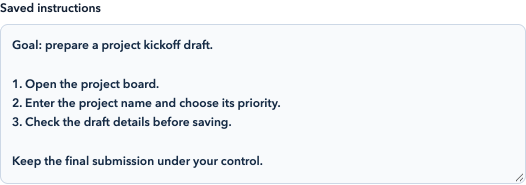
Current CopyCat interface preview with fictional sample instructions. No new recording analysis or skill run was performed.
Open full-size image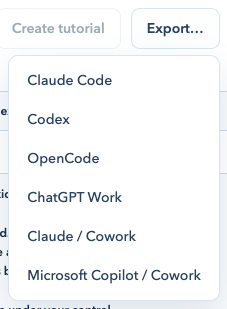
Current CopyCat interface preview showing the export targets. Choose Claude Code for the Markdown skill export; this screenshot does not demonstrate installation or execution.
Open full-size image- 1. Record one complete routine in Chrome
In CopyCat for Chrome, choose Start recording, perform the routine with fictional or non-sensitive values, and choose Stop recording. Use Pause before manual sign-in or sensitive input. When you stop, CopyCat selects representative screenshots and analyzes them with the necessary context through your CopyCat account, which uses account credits.
- 2. Review the saved instructions
Open the completed workflow in the library. Read the editable Saved instructions, check the input fields and answer any clarification questions. Replace one-off values with named inputs and add what to do when information is missing.
- 3. Add the boundary
Write the stop point in plain words, for example “Stop at the review screen.” Name anything Claude must never do, such as sending, deleting or paying.
- 4. Export for Claude Code
Choose Export… and then Claude Code. The browser extension downloads a Markdown file named after the workflow slug with -claude.md. Its frontmatter carries a name and a description, and the body includes your instructions, clarification answers, an Inputs list and the starting browser tabs. The Inputs list shows each saved value, so replace private ones before you share the file.
- 5. Place the file and start a new session
Save it as SKILL.md in ~/.claude/skills/<skill-name>/, or in .claude/skills/<skill-name>/ inside a repository to limit it to that project. Then start a new Claude Code session. The desktop app can write to the personal skills folder for you and asks before replacing an existing file.
Small edits that make the skill easier to use
These optional changes come from Claude Code’s documentation, not from the export. Setting disable-model-invocation to true means only you can start the skill, which suits anything with side effects. The allowed-tools field lists tools Claude may use without asking while the skill runs. Where a skill needs a value from you, the text after the skill name replaces $ARGUMENTS, so you can type the month when you run the invoice check.
- Keep the description specific so the skill is chosen for the right requests.
- Keep SKILL.md short and move long reference material into separate files in the same folder.
- Re-read the file after editing; the exported text is a starting point.
Check loading, then test the behavior
Exporting a file shows that CopyCat wrote instructions. It does not show that Claude Code found the skill, and finding the skill does not show that it can finish the work. Start a fresh session in the right project and look for the skill in the slash menu. Then run it once with fictional inputs in a safe account and compare the result with your recording. If the browser or workspace tools are missing, fix that before judging the instructions.
Pick the target carefully. Claude Code, OpenCode, ChatGPT Work and Claude / Cowork are separate entries in the Export menu. OpenCode writes command Markdown rather than a skill, and ChatGPT Work produces a plugin package with its own installation steps.
Common questions
Do I need to write code to build these skills?
No. You record the routine, edit the saved instructions in plain language and export the file. Editing the optional frontmatter fields is the only technical step.
Will the skill repeat my clicks exactly?
Do not assume so. The exported file is a set of instructions, not a macro. Claude Code decides how to act with the tools it has, which is why the stop point and your test matter.
Can I share the skill file with a teammate?
You can, but first check the Inputs list and starting tabs for private values and addresses. A project skill committed under .claude/skills is shared with everyone who uses that repository.
Does recording send my screen to a server?
On stop, CopyCat selects representative screenshots and sends them with action and navigation context for analysis through your account. Editing images afterwards cannot recall images already submitted, so keep private information out of the demonstration.
Claude Code skills documentation
Explore CopyCat’s recording and export tools
Review the Mac and Chrome options, privacy information, and account and credit requirements before you record. Exporting instructions does not establish that a workflow has been tested.
Explore CopyCatRead CopyCat privacy information