FormBlessed guide
What an AI form filler reads, and what you still check
A document-based AI form filler reads the file you choose, such as a PDF, a Word file, an image or a spreadsheet, and matches facts in it to the fields on a web form. It does not know anything about you beyond that file. FormBlessed, a Chrome extension, fills the fields it can match and marks what it could not find or had to interpret. You still confirm every value against its source, enter anything missing and choose Save yourself.
1. What the filler reads
FormBlessed accepts PDF, DOCX, XLSX, PPTX, CSV, PNG, JPG and WebP files, and it can import Google Docs, Slides and Sheets files through Google Drive. Each file can be up to 16 MB. Older DOC, XLS and PPT files, macro-enabled files, and other image formats are not supported.
It reads only what is in the files you add. It does not look through your email, your browser history or your saved Chrome addresses. If a fact is not in the document, it has nothing to match.
On the other side, it reads the form that is open in your Chrome tab: the labels of the fields, the options in a drop-down and the kind of control. It works on the fields it observes on the page you are on, so a long application is handled page by page.
| What it reads | Where from | Why it matters |
|---|---|---|
| Names, dates, addresses, line items | The document you added | Values come from the file. Nothing is invented to fill a gap. |
| Field labels, options and control types | The web form in the open tab | A value is matched to a field by what the form asks, not by position. |
| Nearby question labels | The same form | They help tell repeated questions apart, such as two education sections. |
2. Set it up and add your document
Open the form in Chrome and open the FormBlessed side panel. FormBlessed requires a Lavenberry account and processing credits. The panel lets you set a maximum number of credits for an application, and form filling and document analysis share that allowance.
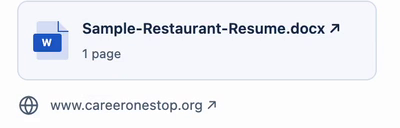
Actual v0.1.7 recording, October 23, 2026: a fictional résumé and a practice website. This example reuses earlier analysis. No account balance is included.
Open full-size imageAdd your file with Choose files or by dropping it into the panel. Check the file name and the website shown in the panel before you start. Under Settings, the document reading method is Guided analysis by default. Direct matching is an option for documents only; spreadsheets always use Guided analysis.
3. Let it fill what it can match
Start the run. FormBlessed reads the document, matches values to the observed fields and fills the controls it supports. Each value it can support carries a reference to a place in the source, such as a spot in a PDF page or a cell in a worksheet.
Some fields are never filled for you. Password fields, verification codes, payment details and fields labelled as Social Security numbers stay redacted and manual. Controls FormBlessed cannot operate are also left to you. The website still decides what it accepts, and a CAPTCHA or a protected step can need manual handling.
4. Check what it flagged, then check the rest
When the run settles, the panel shows how many fields were filled and how many need you. A field the document does not answer is left empty and marked Missing information. A value where the form wanted a different format than the document used is marked as a derived interpretation that requires review.
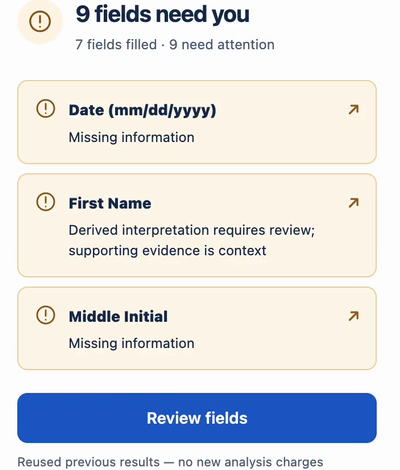
Actual v0.1.7 recording: missing facts and a derived interpretation still need review. The visible footer identifies reused results. Source inspection and submission are not shown.
Open full-size imageA source reference lets you compare a value with the line it came from. It does not prove the value is right, and a field without a flag can still be wrong. Read the whole form once before you go on.
- Open each flagged field and compare it with its source.
- Check dates, especially month-only dates and roles that are still current.
- Check names, numbers and identifiers character by character.
- Fill missing facts yourself after confirming them from a reliable record.
- Look for fields the website cleared or rejected after filling.
5. Save only when the page looks right
Choose Save in FormBlessed, or save on the website yourself. FormBlessed’s Save presses the website’s own control and looks for the website’s confirmation. It does not submit the form on its own and it does not move through website pages for you. If the outcome of a Save is uncertain, check the website before you try again.
What an AI form filler does not do
It fills a web form from a document. It does not edit the document, and it is not a PDF editor. It does not write free-form answers, summaries or cover letters. It does not decide preferences or permissions that your document does not state.
Spreadsheet support does not mean bulk submission: FormBlessed fills one connected form record at a time and you review and save each one.
FormBlessed sends the content you select to third-party AI and document-recognition providers, so processing is not on-device. Read the FormBlessed privacy notice before you add a document with sensitive details, and leave out what the form does not need.
Common questions
Does an AI form filler know my details already?
No. FormBlessed uses only the files you add. If a fact is not in them, the field stays empty and is flagged.
Can I trust a value that has a source reference?
Use it as a way to check, not as proof. The reference shows where a value came from. You still decide whether it is right for this question.
Does it submit the form for me?
No. You choose Save, either in FormBlessed or on the website, and you read the website’s confirmation.
Is my document processed on my computer?
No. The content you select is sent to third-party AI and document-recognition providers. The FormBlessed privacy notice names them and explains retention and your choices.
See whether FormBlessed fits your form
Review supported sources, account requirements and privacy information before you choose to install. Compatibility varies by website.
Explore FormBlessedRead the FormBlessed privacy notice